[OpenSearch] OpenSearch Serverless 사용 후기 (테스트 기반)
서버리스로 마이크로서비스를 구성하는 일을 하다 보면, 인프라를 직접 만지는 시간이 점점 아까워집니다. 특히 검색엔진은 “한 번 올려두면 늘 켜져 있어야” 하는 성격이 강해서, 트래픽이 낮은 구간에도 고정 비용이 꾸준히 나가고 운영 포인트(노드, 스냅샷, 업그레이드, 샤드 튜닝)도 계속 생깁니다.
그래서 Amazon OpenSearch Serverless를 실제로 붙여보면서 “어디까지 편해지고, 어디서부터는 앱에서 책임져야 하는지”를 테스트로 확인해봤습니다.
1) 한 번에 이해하는 결론
- 운영 부담은 확실히 줄어듭니다. 노드/샤드/리프레시 같은 인프라 제어를 AWS가 가져가면서, “클러스터를 운영하는 감각”이 거의 사라집니다.
- 대신 앱 레벨에서 감당해야 할 ‘가시화 지연’과 ‘비용 스파이크’가 생깁니다. 특히 벡터 컬렉션은 리프레시가 60초로 고정이라, “쓰기 직후 즉시 읽기”가 필요한 워크로드라면 폴링/재시도 패턴이 필수입니다.
- API/플러그인 호환성은 사전 대조가 필수입니다. Serverless는 OpenSearch API의 서브셋만 지원하고, 특히 벡터 컬렉션은 Lucene ANN 미지원, Faiss HNSW만 지원 등 제약이 명확합니다. -> 마이그레이션하기 까다로울 수 있어요ㅜ
2) 테스트 구성
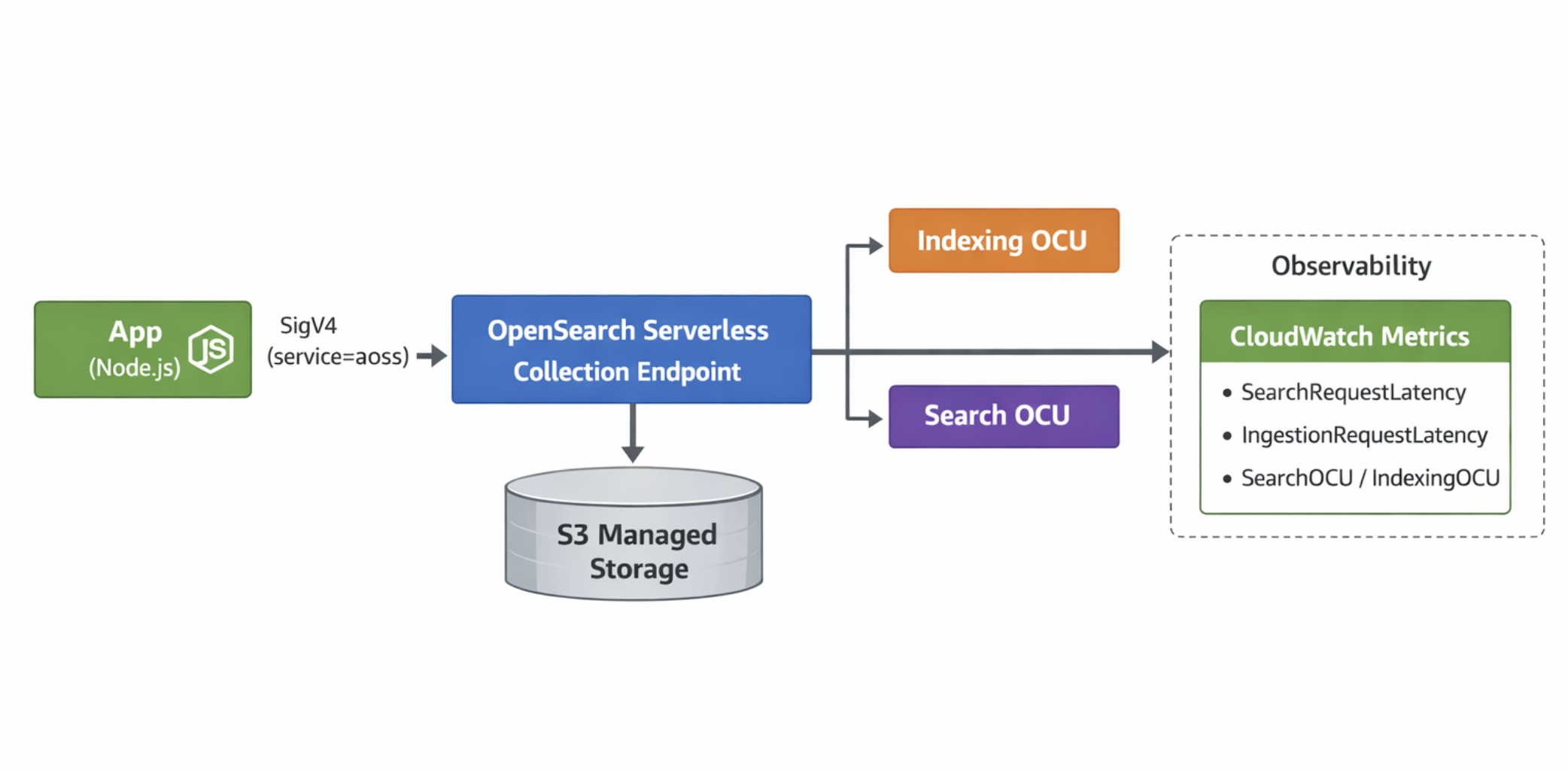
기존에 사용하던 프로비저닝된 os와 serverless os를 아래처럼 구성하였으며,
동일한 기능(CRUD / Bulk / Search / Autocomplete / Vector(knn)) 에 대해 최소 수정으로 비교했습니다.
테스트 환경
- Runtime: Node.js + TypeScript
- Client:
@opensearch-project/opensearch - Auth
- 기존(OpenSearch Service / 자체 관리):
service = es - Serverless:
service = aoss(SigV4)
- 기존(OpenSearch Service / 자체 관리):
- 컬렉션
- Search 컬렉션: 일반 텍스트 검색
- Vector 컬렉션: k-NN 벡터 검색
Architecture Sketch
3) 연결 방식 비교: 엔드포인트는 비슷한데, 인증 방식이 다릅니다
3-1) 기존(Provisioned) — service: es
import { Client } from '@opensearch-project/opensearch';
import { AwsSigv4Signer } from '@opensearch-project/opensearch/aws';
import { defaultProvider } from '@aws-sdk/credential-provider-node';

export const provisionedClient = new Client({
  ...AwsSigv4Signer({
    region: 'ap-northeast-2',
    service: 'es',
    getCredentials: () => defaultProvider()(),
  }),
  node: 'https://your-domain.ap-northeast-2.es.amazonaws.com',
});
3-2) Serverless — service: aoss
import { Client } from '@opensearch-project/opensearch';
import { AwsSigv4Signer } from '@opensearch-project/opensearch/aws';
import { defaultProvider } from '@aws-sdk/credential-provider-node';

export const serverlessClient = new Client({
  ...AwsSigv4Signer({
    region: 'ap-northeast-2',
    service: 'aoss',
    getCredentials: () => defaultProvider()(),
  }),
  node: 'https://xxxxxx.ap-northeast-2.aoss.amazonaws.com',
});
요점
- 코드 레벨에서 가장 큰 차이는 Client 내
service값입니다.- serviec: `es` -> serviec: `aoss`
4) 인덱스 생성: 설정을 ‘덜’ 넣을수록 잘 됩니다
Serverless는 샤드/레플리카/리프레시 같은 핵심 튜닝 요소를 서비스가 관리합니다.
즉, 기존처럼 “인덱스 settings를 빡세게 넣어” 최적화하려는 접근이 잘 안 맞습니다.
4-1) 기존 방식(Provisioned) — settings 중심
await provisionedClient.indices.create({
  index: 'posts',
  body: {
    settings: {
      number_of_shards: 3,
      number_of_replicas: 1,
      refresh_interval: '1s',
    },
    mappings: {
      properties: {
        title: { type: 'text' },
        content: { type: 'text' },
        createdAt: { type: 'date' },
      },
    },
  },
});
4-2) Serverless 방식 — mappings 중심 (settings는 최소화)
await serverlessClient.indices.create({
  index: 'posts',
  body: {
    mappings: {
      properties: {
        title: { type: 'text' },
        content: { type: 'text' },
        createdAt: { type: 'date' },
      },
    },
  },
});
쉽게 말하면
- 기존은 “내가 샤드/리프레시를 결정”
- Serverless는 “AWS가 알아서 결정”
- 그래서 테스트 초기에는 settings를 최소화하는 게 시행착오를 확 줄여줍니다.
5) 케이스 별 비교
아래는 실제로 많이 사용하는(ㅎㅎ제가 많이 사용하는) 케이스들 위주로 정리했습니다.
5-1) CRUD는 거의 동일하게 동작합니다
기본 CRUD(save/read/update/delete)는 큰 차이 없이 이식됩니다.
예시 상황
- “게시글/상품/문서” 단위로 저장하고, 상세 조회(IDs)와 조건 검색을 섞어 씁니다.
예시 코드
type Post = { id: string; title: string; content: string; createdAt: string };

export async function upsertPost(client: any, post: Post) {
  await client.index({
    index: 'posts',
    id: post.id,
    document: post,
  });
}

export async function getPost(client: any, id: string) {
  const res = await client.get({ index: 'posts', id });
  return res._source as Post;
}

export async function updateTitle(client: any, id: string, title: string) {
  await client.update({
    index: 'posts',
    id,
    doc: { title },
  });
}

export async function deletePost(client: any, id: string) {
  await client.delete({ index: 'posts', id });
}
동작 설명
index()는 “저장(또는 덮어쓰기)”get()은 “ID로 바로 읽기”update()는 “부분 수정”delete()는 “삭제”
여기까지는 Serverless도 크게 다르지 않습니다.
5-2) Bulk 인덱싱은 동일하지만, ‘가시화 지연’을 더 의식해야 합니다
Bulk 자체는 잘 되지만, 쓰기 직후 바로 검색되는 걸 기대하면 실패합니다.
이 점에서 저는 프로비저닝에서 서버리스 마이그레이션을 포기했습니다🤗
예시 상황
- 배치 작업으로 하루치 데이터를 대량 적재하고, 적재 직후 “정상 적재 여부”를 검색으로 확인합니다.
예시 코드
export async function bulkIndexPosts(client: any, posts: any[]) {
  const body = posts.flatMap((doc) => [
    { index: { _index: 'posts', _id: doc.id } },
    doc,
  ]);

  const res = await client.bulk({ refresh: false, body });

  if (res.errors) {
    const failed = res.items
      .map((it: any, i: number) => ({ it, i }))
      .filter(({ it }) => it.index?.error);
    throw new Error(`bulk failed: ${failed.length}`);
  }

  return { took: res.took, count: posts.length };
}
동작 설명
- Bulk는 “여러 문서를 한 번에” 넣습니다.
- 문제는 넣자마자 검색에서 보이냐인데, Serverless에서는 컬렉션 타입에 따라 리프레시가 고정입니다.
가시화(Refresh) 체감 정리
| 컬렉션 타입 | 리프레시(가시화) 주기 | 사용자가 조정 가능? | 앱에서 해야 하는 것 |
| Search / Time series | 약 10초 | ❌불가 | “즉시 일관성”이 필요하면 재시도 고려 |
| Vector | 60초 | ❌불가 | 폴링/재시도 거의 필수 |
5-3) “쓰기 직후 읽기(즉시 일관성)”가 필요하면 폴링 배리어를 둡니다
Serverless에서는 refresh=wait_for 같은 감각을 기대하기 어렵고, 앱에서 가시화 배리어를 구현하는 편이 현실적입니다.
예시 상황
- 사용자가 글을 저장하면 “바로 검색 결과에 노출”되어야 합니다.
예시 코드: ID 기반 폴링(재시도) 패턴
function sleep(ms: number) {
  return new Promise((r) => setTimeout(r, ms));
}

export async function waitUntilSearchable(params: {
  client: any;
  index: string;
  id: string;
  timeoutMs?: number;
  intervalMs?: number;
}) {
  const { client, index, id } = params;
  const timeoutMs = params.timeoutMs ?? 70_000; // vector 60s + buffer
  const intervalMs = params.intervalMs ?? 1_000;

  const started = Date.now();
  while (Date.now() - started < timeoutMs) {
    try {
      // 1) get은 상대적으로 먼저 보일 때가 많아(워크로드에 따라) 우선 확인
      await client.get({ index, id });

      // 2) 실제 서비스가 search 기반이라면, search로도 한 번 확인(선택)
      const s = await client.search({
        index,
        size: 1,
        query: { ids: { values: [id] } },
      });
      if ((s.hits?.hits?.length ?? 0) > 0) return true;
    } catch {
      // not found
    }

    await sleep(intervalMs);
  }

  return false;
}
동작 설명
- 배리어(Barrier) 는 “검색이 될 때까지 기다리는 문”입니다.
- Serverless는 리프레시를 사용자가 제어할 수 없으니, “서비스의 가시화 주기”를 앱이 받아들이고 타임아웃/재시도 정책으로 감쌉니다.
- 그럼에도 불구하고, 전반적인 사용자 경험은 기대에 못 미쳤습니다.
5-4) 자동완성: 플러그인/토크나이저에 의존했다면 재설계 해야합니다
기존에 커스텀 분석기/플러그인(예: 형태소 분석, edge n-gram)로 자동완성을 “검색엔진에서” 해결했다면, Serverless에서는 표준 기능 기반으로 접근을 바꾸는 게 안전합니다.
예시 상황
- 한국어 자동완성(초성/자모 분해, qwerty 변환 등) 품질을 올리기 위해 커스텀 필드와 커스텀 분석기를 사용했습니다.
권장 접근
- 클라이언트 전처리(자모/키보드 변환) 는 앱에서 유지
- 검색엔진은 표준 쿼리(prefix/match/wildcard 조합) 로 처리
- 품질과 비용(쿼리 무거움)은 캐싱(Redis) 으로 상쇄
예시 코드: “prefix + match + wildcard” 조합
export async function autocomplete(client: any, q: string) {
  const body = {
    size: 10,
    query: {
      bool: {
        should: [
          { prefix: { title: q } },
          { match: { title: { query: q, operator: 'and' } } },
          { wildcard: { title: `*${q}*` } },
        ],
        minimum_should_match: 1,
      },
    },
  };

  const res = await client.search({ index: 'posts', body });
  return res.hits.hits.map((h: any) => h._source);
}
동작 설명
prefix는 “앞 글자가 같으면”match는 “분석 기반 텍스트 매칭”wildcard는 “부분 포함(비싸지만 강함)”
핵심은 자동완성을 검색엔진에 ‘전부’ 맡기지 말고, 앱에서 정책화하는 것입니다.
5-5) Vector indexing: 기능은 명확하지만, 제약도 명확합니다
벡터 컬렉션은 “RAG/추천/유사도 검색”에 바로 쓰기 좋지만, 리프레시 60초 고정 + 엔진/알고리즘 제약을 설계에 반영해야 합니다.
예시 상황
- 임베딩 벡터를 저장하고, 유사 문서를 top-k로 찾습니다.
예시 코드: k-NN 검색
export async function knnSearch(client: any, vector: number[]) {
  const res = await client.search({
    index: 'vectors',
    size: 5,
    query: {
      knn: {
        embedding: {
          vector,
          k: 5,
        },
      },
    },
  });

  return res.hits.hits.map((h: any) => ({
    id: h._id,
    score: h._score,
    doc: h._source,
  }));
}
벡터 컬렉션에서 확인한 “필수 제약 체크리스트”
| 항목 | 내용 | 영향 |
| Refresh | 60초 고정 | 쓰기 직후 검색 노출이 늦음 → 폴링 필요 |
| ANN 엔진 | Lucene ANN 미지원 | 특정 튜닝/동작 기대치가 달라질 수 있음 |
| 알고리즘 | - Faiss 기반 HNSW만 지원 - IVF/IVFQ 미지원 |
대규모/압축 전략에서 선택지가 줄어듦 |
| Script | inline/stored script 미지원 | 스코어 커스텀/스크립트 필터 전략 제한 |
6) 보안 모델: FGAC보다 단순하지만, 경계가 ‘Collection’으로 올라갑니다
Serverless에서 가장 마음이 편해지는 지점은 보안입니다.
6-1) 기존(FGAC)에서 자주 겪는 피로
- 역할/매핑/인덱스 권한/필드 권한을 클러스터 안에서 관리
- 환경/팀이 늘수록 설정이 기하급수적으로 복잡해짐
6-2) Serverless의 핵심: “Collection 단위 격리 + IAM 정책”
{
  "Rules": [
    {
      "ResourceType": "collection",
      "Resource": ["collection/search-prod"],
      "Permission": [
        "aoss:DescribeCollectionItems",
        "aoss:CreateCollectionItems",
        "aoss:UpdateCollectionItems"
      ]
    }
  ]
}
쉽게 말하면
- FGAC: “같은 클러스터에서 세밀하게 자르는 방식”
- Serverless: “애초에 컬렉션을 분리해서 경계를 크게 가져가는 방식”
팀/환경 격리가 중요하면 Serverless 쪽이 훨씬 운영 친화적입니다.
7) 비용 구조
: ‘최저 비용은 존재’하고, ‘스파이크도 존재’합니다
Serverless의 비용은 “쓴 만큼”이라는 말만 믿고 가면 위험합니다.
7-1) 테스트하며 체감한 부분
- 트래픽이 낮은 서비스에서는 고정 노드 과금보다 체감이 좋을 수 있음
- 트래픽이 튀는 서비스에서는 OCU가 따라 붙으면서 비용이 튀는 구간이 생김
| 구분 | Provisioned(노드) | Serverless(OCU) |
| 기본 과금 | 인스턴스 시간 | OCU-시간(인덱싱/검색 분리) |
| 탄력성 | 수동(또는 제한적 자동) | 자동 스케일 |
| 운영 난이도 | 노드/샤드/업그레이드 부담 | 운영 부담 감소 |
| 비용 리스크 | 저트래픽 구간 낭비 | 스파이크 구간 비용 튐 |
운영 팁: “최대 OCU 한도”는 초기에 꼭 걸어두기
- Serverless는 기본적으로 자동으로 올라갑니다.
- 그래서 “올라가도 되는 최대치”를 먼저 잠가두고(collection group capacity limits) 관찰하면서 풀어가는 방식이 안전합니다.
8) 모니터링: CloudWatch 지표를 ‘비용/품질’의 센서로 씁니다
Serverless는 “노드를 못 보니까” 관측이 더 중요해집니다.
추천 지표
- Latency
SearchRequestLatencyIngestionRequestLatency
- Capacity / Cost Signal
SearchOCU,IndexingOCU
- Rate
SearchRequestRate
- Storage
StorageUsedInS3
Alarm Map

9) 마이그레이션: “지원 여부 대조 → 가시화 배리어 → 비용 한도”
실제로 옮길 때 순서가 중요했습니다.
- Supported operations 대조
- “되는 API만 된다”가 Serverless의 기본값입니다.
- 인덱스 settings 최소화
- 샤드/리프레시/고급 설정을 줄이고 mappings 위주로 시작
- 가시화 배리어(폴링/재시도) 도입
- 특히 벡터 컬렉션은 필수
- 최대 OCU 한도 설정 + 알람 구성
- 초기 비용 스파이크 방지
- 기능 재설계 구간 분리
- 자동완성/커스텀 분석기/스크립트 기반 로직은 별도 트랙으로
10) 언제 Serverless가 ‘정답’이었나
잘 맞았던 경우
- 운영 인력이 제한적이고, 검색엔진 운영이 계속 발목을 잡을 때
- 팀/환경 별로 데이터 경계를 확실히 나누고 싶을 때(컬렉션 분리 + IAM)
- 로그/검색 트래픽이 일정하지 않아 탄력성이 가치가 클 때
고민이 필요했던 경우
- “쓰기 직후 즉시 검색 노출”이 제품 요구사항인 경우
- 자동완성 품질을 엔진 내부 플러그인/분석기로 강하게 끌어올린 경우
- 트래픽 스파이크가 잦고, 상한을 잘못 잡으면 비용이 튀는 경우
11) 결론
테스트를 이틀에 걸쳐서 진행하고, 잊고있다가 월말에 AWS Cost Explorer을 보고 진짜 화들짝 놀랐습니다ㅎ
한 달 동안 무려 200달러~~
Lambda는 비용이 굉장히 적어서 얘도 그럴 줄 알았는데(비용 안찾아보고 테스트해본 내 잘못이긴 해요),
Opensearch Serverless는 ‘안 쓰면 0원’이 아니더라고요!
OpenSearch Serverless는 컬렉션을 켜두면 최소 OCU(검색/인덱싱)가 상시 잡히는 구조라서, 트래픽이 거의 없어도 기본 비용이 꾸준히 쌓일 수 있습니다.
혹시 저처럼 마이그레이션을 고려하며 테스트해보실 분들은!!!
- 테스트 끝나면 **컬렉션/스토리지/정책**까지 “삭제했는지” 꼭 확인하기
- 가능하면 처음부터 **중복(HA) 옵션**을 최소로 두고 시작하기
- 계정/리전 단위로 **최대 OCU 한도**를 잠가서 비용 스파이크 방지하기
- CloudWatch에서 지연/OCU 지표를 보고 “내가 지금 돈을 태우고 있나” 상시 감시하기
다들 과금 조심~💸~💸~💸~💸
12) 참고자료 (공식 문서 / 논문 / 이슈)
- AWS Docs: OpenSearch Serverless overview
https://docs.aws.amazon.com/opensearch-service/latest/developerguide/serverless-overview.html
- AWS Docs: Vector search collections (limitations 포함)
https://docs.aws.amazon.com/opensearch-service/latest/developerguide/serverless-vector-search.html
- AWS Docs: Supported operations and plugins
https://docs.aws.amazon.com/opensearch-service/latest/developerguide/serverless-genref.html
- AWS Docs: Managing capacity limits
https://docs.aws.amazon.com/opensearch-service/latest/developerguide/serverless-scaling.html
- AWS Docs: Monitoring with CloudWatch
https://docs.aws.amazon.com/opensearch-service/latest/developerguide/monitoring-cloudwatch.html
- AWS Pricing: OpenSearch Service / Serverless pricing
https://aws.amazon.com/opensearch-service/pricing/
- AWS Big Data Blog: CloudWatch setup guide for Serverless (alarms 예시)
https://aws.amazon.com/blogs/big-data/amazon-opensearch-serverless-monitoring-a-cloudwatch-setup-guide/
- AWS re:Post: refresh=wait_for 지원 관련 Q&A
https://repost.aws/questions/QUSYfaKYMzTn2dUPr-oW9maA/aws-opensearch-serverless-supports-for-refresh-wait-for-and-refresh-true
- (운영 관점) getoto Noise: OpenSearch Service 글 모음
https://noise.getoto.net/tag/amazon-opensearch-service/
What is Amazon OpenSearch Serverless? - Amazon OpenSearch Service
What is Amazon OpenSearch Serverless? Amazon OpenSearch Serverless is an on-demand, serverless option for Amazon OpenSearch Service that eliminates the operational complexity of provisioning, configuring, and tuning OpenSearch clusters. It’s ideal for or
docs.aws.amazon.com
What is Amazon OpenSearch Serverless? - Amazon OpenSearch Service
What is Amazon OpenSearch Serverless? Amazon OpenSearch Serverless is an on-demand, serverless option for Amazon OpenSearch Service that eliminates the operational complexity of provisioning, configuring, and tuning OpenSearch clusters. It’s ideal for or
docs.aws.amazon.com
Amazon OpenSearch Service | Noise
Post Syndicated from Channy Yun (윤석찬) original https://aws.amazon.com/blogs/aws/amazon-opensearch-service-improves-vector-database-performance-and-cost-with-gpu-acceleration-and-auto-optimization/ Today we’re announcing serverless GPU acceleration
noise.getoto.net
- Amazon OpenSearch Serverless Developer Guide
https://docs.aws.amazon.com/opensearch-service/latest/developerguide/serverless-overview.html
- OpenSearch Documentation: Vector search techniques
https://docs.opensearch.org/latest/vector-search/
- OpenSearch k-NN (issues)
https://github.com/opensearch-project/k-NN/issues
- AWS Pricing (Serverless)
https://aws.amazon.com/opensearch-service/pricing/
'BE 공부 > 검색엔진' 카테고리의 다른 글
| [OpenSearch/Elasticsearch] 검색엔진 매핑 타입 에러 오류 패턴 분석 (0) | 2026.01.20 |
|---|---|
| [OpenSearch] k-NN 벡터 검색 적용하기 (2) | 2025.06.13 |
| [OpenSearch]클러스터 구성: 마스터 노드 + 데이터 노드 (3) | 2025.03.07 |
| [OpenSearch] FGAC(Fine-Grained Access Control)와 JWT 활용 (1) | 2025.01.22 |
| [ElasticSearch] 낙관적 동시성 제어(Optimistic Concurrency Control, OCC) (0) | 2024.09.09 |


댓글